
YouTube Help Videos
VS2013 C++ libraries
- OBS requires this framework ( this reduces the installer size since the same VS2013 libs are used for all versions/releases of OBS, but requires an additional step )
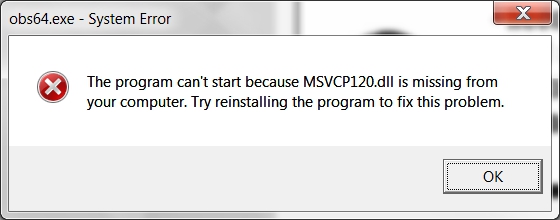
VS2013 Redistributable
Source: https://www.microsoft.com/en-ca/download/details.aspx?id=40784
Visual C++ Redistributable Packages for Visual Studio 2013
If your download does not start after 30 seconds,
- Install Instructions
- To download all files and then install:
- On this page, choose the Download button.
- Select the .exe option and then choose the Next button.
- To install now, choose the Run button.
- To install later, choose the Save button. (The computer does not have to be connected to the Internet.)
D3D libraries
Could not find any D3DCompiler libraries
Windows Software Development Kit (SDK) for Windows 8.1
The Windows Software Development Kit (SDK) for Windows 8.1 contains headers, libraries, and tools you can use when you create apps that run on Windows operating systems. You can use the Windows SDK, along with your chosen development environment, to write Windows Store apps and desktop apps for Windows 8.1 as well as Windows 8, Windows 7, Windows Vista, Windows Server 2012, Windows Server 2008 R2, and Windows Server 2008.
The Windows SDK also includes the Windows App Certification Kit 3.3 (Windows ACK) to test your app for the Windows 7, Windows 8, Windows 8.1, and Windows 8.1 Phone certification program.
The Windows SDK no longer ships with a complete command-line build environment. You must install a compiler and build environment separately. If you require a complete development environment that includes compilers and a build environment, you can download Visual Studio 2013, which includes the appropriate components of the Windows SDK. To download the SDK and install it on another computer, click the download link and run the setup. Then in the Specify Location dialog box, click Download the Windows Software Development Kit for installation on a separate computer.
Install and download (974 KB, English)
Last updated: April 29, 2015
Originally published: October 17, 2013
Note: For the latest SDK and mobile emulator, see Downloads and tools for Windows.
DirectX
DirectX End-User Runtime Web Installer
Source: https://www.microsoft.com/en-us/download/confirmation.aspx?id=35
If your download does not start after 30 seconds, Click here
- Install Instructions
-
- Click the Download button on this page to start the download, or choose a different language from the drop-down list and click Go.
- Do one of the following:
- To start the installation immediately, click Open or Run this program from its current location.
- To copy the download to your computer for installation at a later time, click Save or Save this program to disk.
-
Notes
Source: https://obsproject.com/forum/threads/could-not-find-any-d3dcompiler-libraries-error.20232/
I know this is an old thread but I ran into the problem with 0.9.1 and thought I'd share the solution. The problem happens if you have never installed any applications that need DirectX, because of this the DLL that OBS needs is not in the path and so cannot be loaded. This happened to me while building a new streaming PC with Windows 7 which doesn't actually have any games on and therefore no DirectX dlls installed. (I still think this is weird as the OS has support for DirectX).
Anyway to the fix.
Couple of things you can do but the latest DirectX Redistributables are shipped as part of the SDK which you can find here:
https://msdn.microsoft.com/en-us/windows/desktop/bg162891.aspx
There is also an interesting article here if you are that way inclined:
http://blogs.msdn.com/b/chuckw/archive/2012/05/07/hlsl-fxc-and-d3dcompile.aspx
Download them and find the right DLL, latest is d3dcompiler_47.dll (make sure you have the x64 version) and then copy it into the directory where you run OBS MP from.
You could also search around on your machine, I had Visual Studio installed which included the DirectX redist and I copied it from there.
Purely for interests sake as well OBS searches for versions of this DLL to use, it starts at version 49 (d3dcompiler_49.dll) and searches on the path decrementing the version each time until it finds a DLL that it can load. So if you can only find d3dcompiler_46.dll then that will work just fine.
Hope that helps
Adrian
Problem appeared again with OBS-Studio 0.16.5, but was really with my locked-down Windows 7 enterprise installation. The D3D file was there, multiple times, just had to be copied to the OBS folder as Adrian suggested. That did the trick! Thanx and a tip of the hat to Adrian Schofield++
This DirectX setup file helps me https://www.microsoft.com/en-us/download/confirmation.aspx?id=35
OSB Remote
- Log in to post comments